How to Share Your Live Location on WhatsApp
Fact-checked on
WhatsApp’s live location feature lets you share your changing location in an individual or group chat for a selected period. It is different from sending a single map pin for your current position.
What You Need
Use WhatsApp on a phone with location services enabled and the required location permission. You also need a connection for updates.
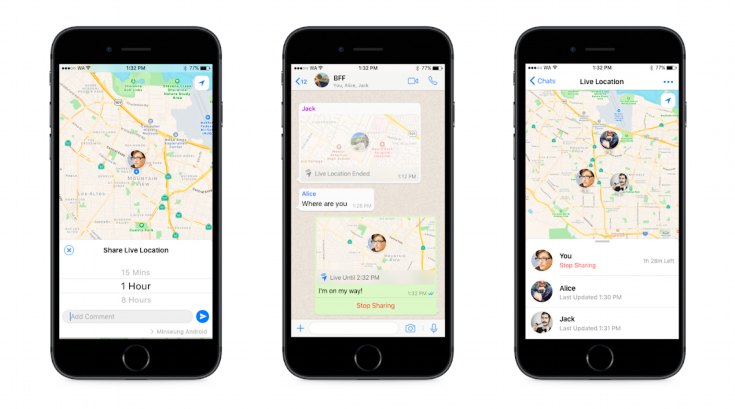
Share Your Location
- Open the chat with the intended person or group.
- Open the attachment menu: usually the paperclip on Android or the plus button on iPhone.
- Choose Location.
- Select Share live location, rather than the option for a one-time current location.
- Choose the available duration, add a message if useful and send.
- Return to the live location message and choose Stop sharing when you want it to end. Otherwise it ends when the selected period expires.
Check Privacy and Accuracy
Review the chat participants before sending, especially in a group. Location updates depend on the phone’s permissions, connection and location services; do not assume a map always shows the person’s precise current position.
Warning: Share only with people you trust. Live location can reveal movements and regular destinations, even when shared for a limited time.
Tip: If you only need someone to find a meeting point, a one-time location pin may be sufficient.